How I Created a Daily Remote Work Routine That Finally Stuck
Learn how I set up a daily remote work routine that boosts focus, efficiency, and work life balance. Practical tips, tools, and step by step guidance for remote workers.

Main Highlights Regarding a Daily Remote Work Routine
Why working from home without a routine slowly destroys focus
The real problems I faced when I had “freedom” but no structure
Tools and materials I personally used to build my daily routine
A step by step process I followed after multiple failed attempts
Practical examples from my real remote work days
Mistakes I made early on and how I corrected them
How I maintain consistency without burnout
Final advice I wish I had followed from day one
The Real Reason I Created a Daily Remote Work Routine
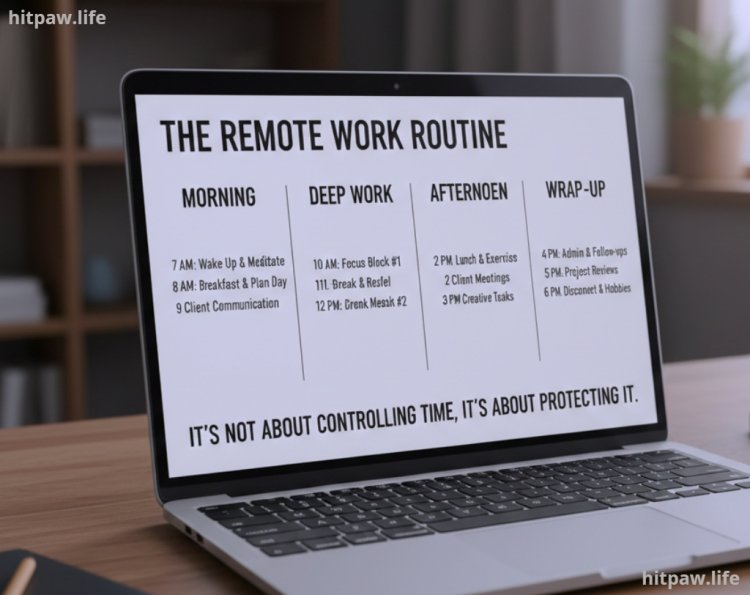
When I started remote work, I believed flexibility meant working whenever I felt like it. In reality, that mindset slowly ruined my productivity, sleep cycle, and motivation. Some days I worked too much, other days I barely worked at all, and most days ended with guilt. Creating a daily remote work routine wasn’t about controlling my time it was about protecting it. This guide is based on the routine I personally built after months of trial, error, frustration, and adjustment.
Why I Needed a Daily Remote Work Routine
Remote work sounds simple until you actually live it. No commute, no office politics, no fixed hours. But without a structure, work starts leaking into every part of your life.
In my early remote days:
I woke up late because “there was no rush”
Work started randomly instead of intentionally
Breaks were unplanned and usually too long
Nights became work hours without realizing it
The biggest problem wasn’t laziness it was decision fatigue. Every day I had to decide when to start, what to do first, and when to stop. That mental load drained me before actual work even began.
That’s when I realized remote work needs more routine than office work, not less.
Materials I Used to Build My Routine
I didn’t use complicated systems. I tested many tools but kept only what truly supported my habits.
Tools I Personally Rely On
Google Calendar for time blocking my day
Notion daily task list and weekly planning
Trello project tracking and deadlines
Pomodoro Timer (Focus To Do) managing focus sessions
Noise canceling headphones deep work protection
Simple desk setup laptop stand, external keyboard, chair
I learned that tools don’t create discipline they reduce friction. The simpler the setup, the easier it is to follow daily.
Step by Step: How I Created My Daily Remote Work Routine
Step 1: I Fixed My Start Time First
Instead of planning my entire day, I locked one non negotiable rule:
I start work at the same time every weekday.
For me, that time is 9:30 AM.
Even if the day goes off track, this single anchor keeps my routine alive. Starting consistently matters more than finishing perfectly.
Step 2: I Built a Calm Start Instead of Rushing Into Work
Earlier, I used to open my laptop and immediately check emails and messages. That instantly put my brain into reaction mode.
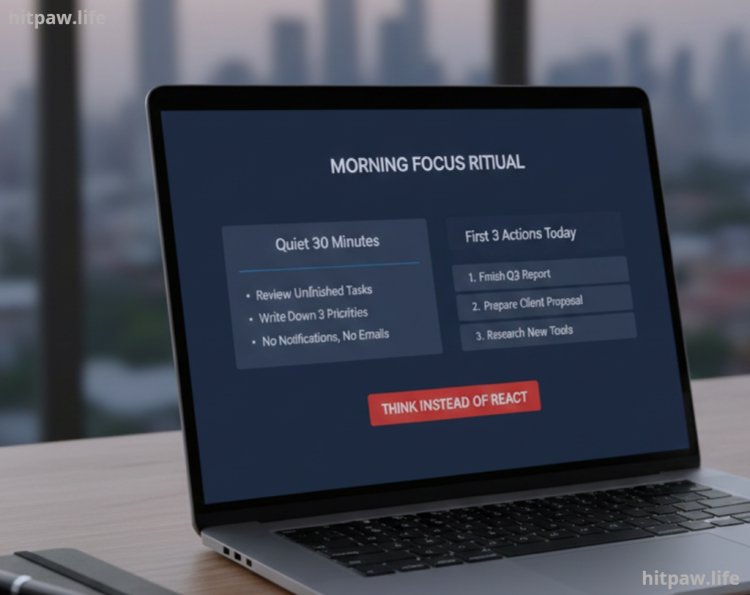
Now, my first 30 minutes are quiet:
Review yesterday’s unfinished tasks
Write down 3 priorities for today
No notifications, no emails
This slow start helps me think instead of react.
Step 3: I Structured My Day Around Energy, Not Hours
I observed my energy levels for two weeks and noticed patterns:
Morning: highest focus
Early afternoon: moderate focus
Late afternoon: low focus
So I adjusted my routine:
Morning: deep work (writing, planning, problem solving)
Afternoon: meetings, emails, admin
Late day: light tasks, review, planning
This one change reduced stress and increased output without extending work hours.
Step 4: I Used Time Blocks Instead of To Do Lists
Long to do lists made me anxious. Now I assign time blocks instead of endless tasks.
Example:
10:00 to 12:00 > writing
12:00 to 12:30 > break
12:30 to 1:30 > admin work
This gives work a boundary and prevents overworking.
Step 5: I Created a Clear End of Day Shutdown
Earlier, work never truly ended. Now I have a shutdown routine:
Review completed tasks
Note unfinished items for tomorrow
Close work tools intentionally
This mental closure helps me relax without guilt.
Practical Examples From My Real Remote Work Days
One practical change that helped a lot:
I stopped mixing personal and work time. Even a short walk between work blocks acts like a “fake commute” and resets my brain.
Another example:
I no longer schedule meetings during my deep work hours. Protecting focus is easier than recovering it.
Remote work rewards clarity, not hustle.
What I Got Wrong the First Time
This is important because perfection didn’t work for me.
My Early Mistakes
Overloading my schedule
Copying office hours blindly
Ignoring breaks
Expecting motivation to show up daily
What Fixed It
Fewer tasks per day
Flexible structure instead of rigid rules
Treating rest as part of productivity
Once I stopped chasing “perfect days,” consistency improved.
How I Keep My Routine Working
|
Routine Element |
How Often I Review It |
|
Start time |
Monthly |
|
Task load |
Weekly |
|
Focus hours |
Monthly |
|
Break quality |
Weekly |
|
Burnout signals |
Daily |
Small adjustments prevent burnout before it starts.
Tips From My Experience
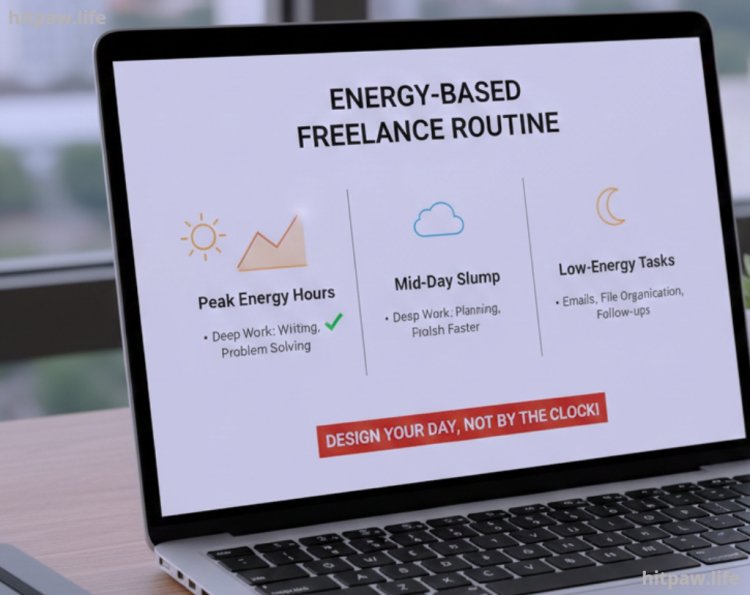
One habit that genuinely changed my remote work routine was designing my day around energy, not the clock. I used to force myself into a strict 9 to 5 schedule, even when my focus was clearly better in the morning. That approach made work feel heavy and slow.
Now, I place my most demanding tasks like deep writing, planning, or problem solving during my high energy hours. I keep low effort work such as emails, file organization, or follow ups for later in the day. This simple shift helped me finish work faster without extending my screen time.
What I’d Tell My Past Self
If I could go back and talk to my past self, I’d say this: stop trying to make remote work perfect from day one. I wasted too much time adjusting tools, changing routines, and comparing my schedule with others instead of simply showing up and working.
I’d remind myself that a daily remote work routine doesn’t need to look impressive it just needs to be repeatable. Even a simple plan done consistently beats a detailed routine that’s never followed.
I’d also tell myself to protect energy, not just time. Taking breaks, logging off properly, and setting boundaries earlier would have saved me from burnout. Remote work gives freedom, but only if you learn how to manage it.
Most importantly, I’d say: build your routine around how you actually work, not how you think you should work. Once I accepted that, everything became easier and more sustainable.
FAQs About Creating a Daily Remote Work Routine
1. How long does it usually take to build a daily remote work routine?
In my experience, it takes around 2 to 3 weeks to feel comfortable and about a month for the routine to feel natural. The key is doing the same small actions daily instead of changing your plan every few days.
2. What if I can’t follow my routine every single day?
That happens more often than people admit. Missing one day doesn’t break a routine quitting does. I simply return to my schedule the next day without trying to “make up” for lost time.
3. Should a remote work routine be strict or flexible?
It should be structured but flexible. I keep fixed start and end times but allow flexibility inside the day. This balance prevents burnout while still keeping work organized.
4. How many hours should I work daily in a remote setup?
Instead of counting hours, I focus on completed work. Some days need 5 to 6 focused hours, others need more. Productivity matters more than sitting in front of a screen all day.
5. What’s the biggest mistake people make when creating a routine?
The biggest mistake I made was copying office schedules. Remote work needs its own system based on energy levels, not traditional 9 to 5 rules.
6. Do I need expensive tools to maintain a routine?
No. I started with just Google Calendar and a simple task list. Tools help, but consistency and clarity matter far more than paid apps.
What's Your Reaction?