How Digital Creators Organize Their Daily Workflow
Learn practical strategies for digital creators to organize their daily workflow. Discover step by step tips, real life examples, and productivity techniques to stay focused and efficient while working remotely.
Main Highlights Regarding How Digital Creators Organize Their Daily Workflow
Digital creators need structure to balance creativity, deadlines, and personal time.
Time management and task prioritization are key for consistent output.
Tools, apps, and routines help streamline content creation, editing, and publishing.
Breaks, boundaries, and reflection prevent burnout and maintain creativity.
Step by step daily workflows can improve both productivity and creative output.
My Struggle With Unstructured Creativity
I’ve been a digital creator for several years, and when I first started, my days were chaotic. I would jump from scripting one video to editing another, check social media constantly, and spend hours on minor tasks. By the end of the day, I felt exhausted and unproductive.
I quickly realized that creativity alone isn’t enough. Without structure, deadlines, and workflow management, even my best ideas often got lost. Over time, I experimented with different approaches until I developed a workflow that actually works. This guide shares my experience, so you can organize your day as a creator efficiently without stifling your creativity.
Materials I Used
To organize my daily workflow, I relied on a combination of digital tools and physical setups:
Trello / Notion for planning tasks, content ideas, and deadlines.
Google Calendar for scheduling content production and personal time.
Focus Booster / Pomodoro Timer for concentrated work sessions.
Canva / Adobe Suite for creating and editing digital content.
Noise Canceling Headphones to maintain focus during creative bursts.
Dedicated Workspace / Desk Setup a space free from distractions.
Notebook / Bullet Journal for daily notes, reflections, and task tracking.
Using these tools consistently helped me stay organized, track progress, and avoid the common pitfall of chaotic multitasking.
Step by Step Workflow: How I Organize My Day as a Digital Creator
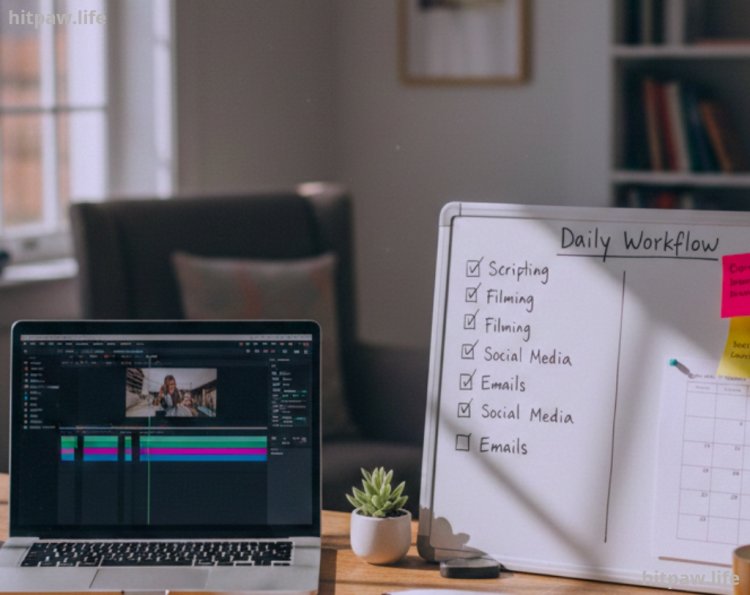
Step 1: Start With a Daily Plan
I start every morning reviewing my daily priorities. I use a simple 3 task rule: identify the three most important content related tasks for the day. Everything else, like checking emails or social media, comes after.
Example:
Task 1: Script a YouTube video.
Task 2: Edit yesterday’s video footage.
Task 3: Schedule posts on social media.
Step 2: Block Time for Focused Work
I divide my day into time blocks. Each block is dedicated to a single task or type of work. For instance:
9:00 to 11:00 AM > Content creation (writing scripts or recording)
11:00 to 11:15 AM > Break
11:15 to 1:00 PM > Editing video footage
1:00 to 2:00 PM > Lunch / Rest
2:00 to 3:30 PM > Design graphics / Thumbnails
3:30 to 3:45 PM > Break
3:45 to 5:00 PM > Scheduling posts / Community engagement
This method keeps me focused on one task at a time, reduces mental fatigue, and ensures steady progress.
Step 3: Prioritize Creativity in the Morning
I noticed my creativity peaks in the morning, so I reserve the first 2 to 3 hours for tasks that require high cognitive effort, like scripting, brainstorming, or designing.
This ensures that I tackle creative tasks before fatigue sets in, rather than leaving them for the afternoon when focus tends to dip.
Step 4: Batch Similar Tasks
I batch tasks that are similar to maintain workflow efficiency. For instance:
Editing all videos in one session
Designing multiple graphics at once
Writing captions and scheduling posts in one block
Batching reduces context switching, saving both time and mental energy.
Step 5: Track Progress and Adjust
At the end of the day, I review completed tasks in Trello and check what didn’t get done. I adjust the next day’s plan accordingly.
Tip: Keep a “catch up block” in your calendar for tasks that spill over. This prevents carryover tasks from piling up.
Step 6: Schedule Breaks and Self Care
Ignoring breaks is a mistake I made early on. Creativity isn’t sustainable without mental rest. My schedule includes:
Short 5 to 10 minute breaks every hour
A longer lunch break away from the desk
Stretching, walking, or even a quick coffee break
Regular breaks refresh my mind and boost creativity for the next work block.
Step 7: Reflection and Notes
At the end of each day, I jot down:
What tasks went well
Which ones lagged
Ideas for improving workflow tomorrow
Reflection ensures that I’m continuously optimizing my daily routine, rather than repeating inefficient patterns.
Practical Real Life Examples
Video Production Overload: At one point, I had multiple videos due in one week. By batching scripting, recording, and editing, I avoided the chaos I experienced initially.
Graphic Design Workflow: I used to create graphics one at a time, switching constantly between tasks. By dedicating one block of the day solely to graphics, I finished them faster with better consistency.
Community Engagement: Initially, I checked comments and social media constantly, which distracted me. Now I schedule a 30minute block at the end of the day for engagement, keeping focus on creation earlier.
What I Got Wrong the First Time
Overloading tasks: I tried to do everything at once, which caused stress and inconsistent output.
Ignoring mental breaks: Skipping breaks lowered creativity and increased mistakes.
No priority system: Without Top 3 tasks, I spent hours on low impact work.
These mistakes taught me that workflow structure, not just effort, drives results.
Tips From My Experience
Batch similar tasks and focus on one high value task per time block.
Don’t check social media constantly schedule it.
End the day with reflection to adjust the workflow for tomorrow.
Wrapping It Up
Creating a daily workflow as a digital creator isn’t about strict schedules or overloading yourself with tasks. It’s about finding a rhythm that fits your energy, your creativity, and your goals. From my experience, building a workflow that balances focused work, breaks, and flexibility is the key to sustained productivity.
Start small, experiment with different tools, and adjust as you go. Consistency beats perfection it’s better to follow a workflow that’s “good enough” every day than to wait for the perfect system. Remember, your routine should serve your creativity, not stifle it.
Ultimately, the workflow that works for you is the one you actually follow. Keep refining it, stay disciplined, and let your daily habits compound into real progress.
FAQs About Organizing a Daily Workflow for Digital Creators
Q1: How long should a digital creator work each day?
A: I’ve found that 6 to 8 focused hours with short breaks is ideal. The key is quality over quantity working fewer, high impact hours is better than burning out with long, unfocused sessions.
Q2: How do I stay focused when working from home?
A: I use a dedicated workspace, noise canceling headphones, and block social media during work sessions. Removing distractions is essential for consistent productivity.
Q3: Should I multitask while creating content?
A: I learned that multitasking kills efficiency. I focus on one main task per block whether it’s scripting, editing, or designing to get better results in less time.
Q4: How do I prevent creative burnout?
A: Scheduling regular breaks, taking short walks, and switching between creative and administrative tasks helps me avoid burnout while keeping ideas fresh.
Q5: What tools help manage a creator’s workflow effectively?
A: I rely on Trello or Notion for task management, Google Calendar for scheduling, Focus Booster for Pomodoro sessions, and Canva or Adobe Suite for design work.
Q6: How do I deal with creative blocks?
A: When I feel stuck, I step away from the desk, brainstorm new ideas, or switch to a different type of task. Sometimes a walk or a change in environment sparks fresh creativity.
Q7: How should I prioritize tasks each day?
A: I follow a Top 3 task system, where I focus on the three most important tasks first. Everything else is secondary, which ensures I always make meaningful progress.
Q8: Can a daily workflow be flexible?
A: Absolutely! My workflow has flexible blocks to accommodate unexpected tasks or creative inspiration, but the structure ensures I stay on track regardless.
What's Your Reaction?